


Table of Contents
-
AI Acceptable Use Policy Template For Clear Employee Decisions
-
Shadow AI Security Risks Often Start In Business Email Workflows
-
An AI Workplace Policy Should Define Approvals, Access, And Accountability
-
A Generative AI Acceptable Use Policy Must Define How Teams Handle Sensitive Data
-
An AI Acceptable Use Policy Gives Your Team Clear Next Steps With Attentus Tech
Category: Cybersecurity
Daniel Colon, Dir. of Managed Services at Attentus Tech, notes: “Start with the workflows employees already use, then define which data stays out of AI tools, who approves exceptions, and how incidents get reported.”
An approval delay starts when an employee pastes a contract, invoice dispute, support ticket, or patient-related note into an AI tool no one has reviewed. Work moves faster for a moment, then slows when IT has to trace what data went where, who had access, and whether customer information left approved systems.
Employees do this to clear work faster. Clear guardrails matter. Nearly half of SMBs have no AI-specific security policies, even though 83% say AI has increased their security risk, and 90% of companies report regular personal AI tool use for work tasks. An AI acceptable use policy reduces shadow AI risks, strengthens AI business security, and gives staff a clearer AI workplace policy for tickets, approvals, invoices, and customer data.
AI Acceptable Use Policy Template For Clear Employee Decisions
A usable policy answers what an AI acceptable use policy should include before someone uploads a customer spreadsheet, vendor invoice, or internal email thread. With 83% saying AI increased security risk, clear rules prevent rework, delayed approvals, and avoidable security reviews.
-
Approved tools only: Name the AI apps employees can use and where.
-
Restricted data types: Block contracts, payroll files, regulated records, and credentials.
-
Human review required: Check AI output before it reaches a client, vendor, or customer.
-
Exception request path: Route unusual needs through IT and leadership.
The Risks Of Shadow AI In Everyday Workflows
What are the risks of shadow AI? Employees use unapproved tools without IT, security, or leadership visibility, so data movement only becomes clear after an alert, dispute, or access question. A 2024 Salesforce survey found 55% of employees used AI tools their organization had not approved.
-
Legal draft exposure: Confidential terms or matter details enter public tools.
-
Accounting file leakage: Tax worksheets, invoices, and bank details leave approved storage.
-
Manufacturing design loss: Product drawings or equipment logs are exposed.
-
Non-profit donor risk: Grant notes and donor histories reveal private information.
|
Workflow Area |
Unapproved AI Use Case |
Operational Signal to Monitor |
Preventive Control Owner |
|---|---|---|---|
|
Legal |
Paralegal pastes contract clauses into a public chatbot |
Browser traffic to consumer AI sites from matter-file devices |
General Counsel approves policy; IT enforces browser and DLP rules |
|
Accounting |
Staff accountant uploads vendor invoices to an AI summarizer |
Bank details or tax IDs leaving Microsoft 365 or ERP storage |
Controller defines tools; Security reviews retention settings |
|
Manufacturing |
Plant supervisor copies equipment logs from SCADA exports |
Maintenance data sent to unsanctioned SaaS platforms |
Operations manager and IT approve production-data access |
|
Non-Profit |
Coordinator uses exported CRM giving histories for outreach |
Donor records downloaded before AI site visits |
Development director reviews consent; IT configures approved AI workspace |
Shadow AI Security Risks Often Start In Business Email Workflows
Email is where AI risks show up fast. The 2026 Verizon DBIR found 45% of employees are regular AI users on corporate devices, with 67% using non-corporate accounts. Verizon also identified shadow AI as the third most common non-malicious data leakage-related activity, with frequent AI tool usage rising from 15% to 45% in one year. Coordinated helpdesk, cybersecurity, monitoring, and user training reduce handoffs.
-
Email chains get copied: Vendor disputes expose pricing, names, attachments, and approvals.
-
Attachments leave controlled systems: Invoices and statements enter unmanaged platforms.
-
AI replies need review: Drafts misstate terms, deadlines, or payment instructions.
-
Shared context reduces handoffs: Alerts, tickets, and user questions use the same issue history.
Build Safer AI Practices
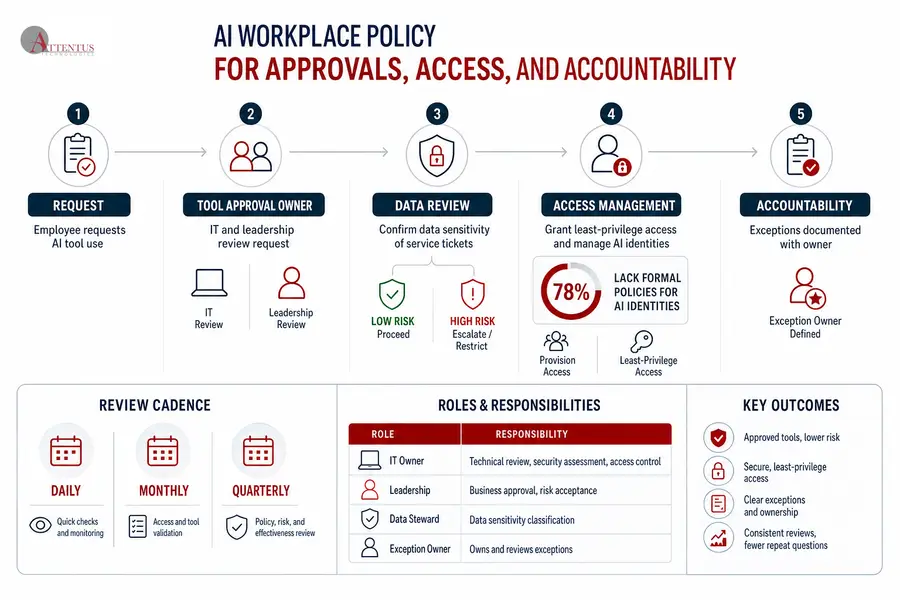
An AI Workplace Policy Should Define Approvals, Access, And Accountability
An employee asks to use a new AI tool to summarize service tickets before a customer report. The AI acceptable use policy for employees should define who reviews the request, checks data sensitivity, grants access, and owns exceptions.
-
Tool approval owner: Assign IT and leadership to review vendor terms and business need; 44% of surveyed CISOs were very or extremely concerned about third-party LLMs.
-
Data review step: Confirm whether tickets include customer, health, financial, or restricted data.
-
Access management process: 78% lack formal policies for AI identities, 79% have moderate or low confidence in preventing NHI-based attacks, and 92% are concerned about employee-used AI agents.
-
Review cadence: Daily, monthly, and quarterly reviews keep exceptions from becoming repeat tickets.
A Generative AI Acceptable Use Policy Must Define How Teams Handle Sensitive Data
Data classification prevents ticket escalations, invoice disputes, trust issues, and compliance exposure. Current research from Axios cited by Proofpoint shows over 4% of GenAI prompts and 20% of uploaded files exposed sensitive corporate data in Q2 2025. A generative AI acceptable use policy needs to cover systems, users, data, workflows, and approvals together.
-
Never enter credentials: Keep passwords, keys, tokens, and recovery codes out of GenAI tools.
-
Protect customer records: Use approved systems for client files and contact details.
-
Limit financial details: Keep invoices, payroll data, and payment instructions controlled.
-
Review source code: Treat proprietary code and architecture notes as restricted.
-
Separate examples from records: Use sanitized AI acceptable use policy examples.
Shadow AI Risks And Mitigation Strategies For Managers
-
Create an intake path: Every AI request should include the tool, user group, data type, business purpose, and deadline.
-
Review tickets and patterns: One in five organizations reported a breach due to shadow AI, while only 37% have policies to manage or detect it.
-
Use monitoring wisely: Advanced tools for detecting shadow AI risks identify browser use, uploads, and risky prompts.
-
Train by workflow: Show teams what safe use looks like for invoices, customer records, approvals, and files.
-
Plan lasting fixes: Scheduled maintenance, ticket review, network activity review, and long-term action plans reduce repeat disruption.
Turn Shadow AI Into Clear Policy
Define approved AI use, sensitive data rules, and accountability with guidance from Attentus Tech.
Shadow AI Compliance Risks Often Start With Missing Records And Unclear Audit Trails In Regulated Work
Shadow AI compliance risks usually begin with missing records, unclear audit trails, permission gaps, data residency questions, or unreviewed vendors. An accounting file summarized in a public tool may not stay in the client file location, and a clinic follow-up note may create confidentiality and retention questions. AI security essentials for business should make those handoffs visible before an audit, complaint, or client question forces a rushed investigation.
For practical AI security control, review real activity often. Daily helpdesk review can spot repeated AI questions, monthly technical review can check access and logs, and quarterly business review can connect policy gaps to growth plans, staffing changes, and modernization needs.
AI Business Security Controls Should Fit Daily Work
Changing daily habits is hard when teams need to close tickets, send invoices, and meet customer deadlines. During a three-month period, 89% of organizations encountered risky AI prompts, with about one in every 41 prompts classified as high risk. In another report, 78% lack formal AI identity policies, 92% aren’t confident their legacy IAM tools can effectively manage AI and NHI risks, and 79% had moderate or low confidence in preventing NHI-based attacks.
-
Approve tool lists: Publish what’s allowed, what’s blocked, and why.
-
Tighten identity controls: Limit access by role and business need.
-
Log key activity: Track usage, uploads, and access changes.
-
Train and report: Make incidents easy to raise early.
-
Match support coverage: Use targeted helpdesk, fully managed coverage, or a customized IT package.
An AI Acceptable Use Policy Gives Your Team Clear Next Steps With Attentus Tech
A strong AI acceptable use policy helps employees move faster without creating avoidable data, security, approval, and compliance problems. Start with what’s already happening.
Attentus Tech can help review your current IT situation, number of users, AI concerns, and support needs, then tailor service recommendations and pricing to your environment. Our end-to-end IT support, customizable managed services, and no-added-cost engineering and procurement scoping for managed services customers make your AI workplace policy easier to operate through one vendor.
.jumpfactor-responsive-table-1792697734451-wrapper{overflow-x:auto;-webkit-overflow-scrolling:touch;margin:20px 0}.jumpfactor-responsive-table-1792697734451{width:100%;border-collapse:collapse;border:1px solid #d1d5db;margin:16px 0}.jumpfactor-responsive-table-1792697734451 td{border:1px solid #d1d5db;padding:12px;text-align:left}.jumpfactor-responsive-table-1792697734451 th{border:1px solid #d1d5db;padding:12px;text-align:left;font-weight:600;background-color:#f9fafb}@media (max-width:768px){.jumpfactor-responsive-table-1792697734451-wrapper{overflow-x:scroll}}