


Table of Contents
Category: General Business
Daniel Colon, Dir. of Managed Services at Attentus Tech, notes: “Start with one workflow where staff already lose time, then define who reviews the AI output before it reaches a customer, invoice, record, or approval.”
At a healthcare clinic, the front desk uses AI meeting notes after a staff huddle, a biller drafts appeal language in a document tool, and a manager tests suggested replies in email. Leadership hasn’t banned anything, but it hasn’t set rules either.
That’s common now. Microsoft and LinkedIn’s 2024 Work Trend Index reported that 75% of knowledge workers use AI at work. The practical issue with AI in business is choosing safe, measurable workflows around tickets, approvals, customer responses, documentation, invoices, reporting, and sensitive data before habits become hard to unwind.
AI In Business Starts With Workflows People Already Know
AI is not one product or a one-time project. It includes generative AI, machine learning, automation, chatbots, copilots, and features already appearing inside Microsoft, Google, CRMs, accounting platforms, helpdesks, cybersecurity tools, and cloud apps. Sort AI by business function before evaluating vendors, because each use touches software, data, users, security, and support.
Adoption is already broad: according to McKinsey, AI adoption across the global business landscape increased to 72% as of 2024, while IDC found that 68% of organizations exploring or working with GenAI said it would affect their business in 2024-2025, and 29% said GenAI had already disrupted their business to some extent.
-
Drafting and summarizing: Meeting notes, email responses, marketing drafts, and procedure documents.
-
Searching company knowledge: Internal documentation, policy lookup, customer history, and project notes.
-
Classifying routine work: Support tickets, lead routing, invoice categories, and service requests.
-
Spotting patterns faster: Reporting support, cybersecurity alerts, inventory changes, and demand signals.
In an accounting office, AI can summarize a client’s long email thread and draft a request for missing W-9s, receipts, or payroll reports. Staff still review the message before it reaches the client, because deadlines, tone, and tax context matter.
The first useful project starts with work people already understand, then accounts for workflow review, data permissions, software licensing, and employee training.
AI For Small Businesses Works Best When The First Project Is Narrow
A small pilot reduces disruption and gives leadership a clearer basis for deciding whether to expand, especially when 38% are actively using AI across multiple business functions. Experiments are common, but ROI can be harder to prove; Pax8 says nearly nine in 10 SMBs are using or experimenting with AI, but few are reporting ROI right now. The best starting point is a low-risk workflow where staff spend too much time on repetitive work and a person can review the output before it affects a customer, invoice, record, or approval.
-
Start with visible friction. Look for meeting summaries, customer intake, spreadsheet cleanup, or ticket classification that slows staff every week.
-
Check the data sensitivity. Keep confidential customer, employee, financial, legal, healthcare, credential, and proprietary data out of unapproved tools.
-
Confirm human review ownership. Assign who reviews outputs before customer communication, financial records, HR decisions, legal drafts, or security actions change.
-
Measure one useful outcome. Track time saved, response speed, duplicate tickets, handoffs, or documentation quality.
-
Choose tools staff will use. Start with familiar platforms before adding another app with more logins, licensing questions, and support tickets.
How To Pick The First Pilot
Change is hard when people already have deadlines, customer expectations, and approval chains. For AI for small businesses to become useful instead of distracting, the first pilot needs a defined owner, a defined risk level, and a clear reason to exist.
-
Inventory repetitive tasks in tickets, inboxes, spreadsheets, approvals, or customer follow-up.
-
Rank use cases by business value and data risk before selecting a tool.
-
Select one workflow owner who can approve the pilot and decide when the output is good enough.
-
Define success before turning the tool on, whether that means faster response time, fewer duplicate tickets, cleaner documentation, or fewer handoffs.
This is also where support needs vary. Some teams only need help reviewing policies and licensing, while others need deeper work across security, cloud settings, helpdesk workflows, and integrations. Attentus Tech’s customizable service packages are designed around that practical difference.
Keep Building Safer AI Foundations
AI For Mid Sized Businesses Needs Governance Before Scale
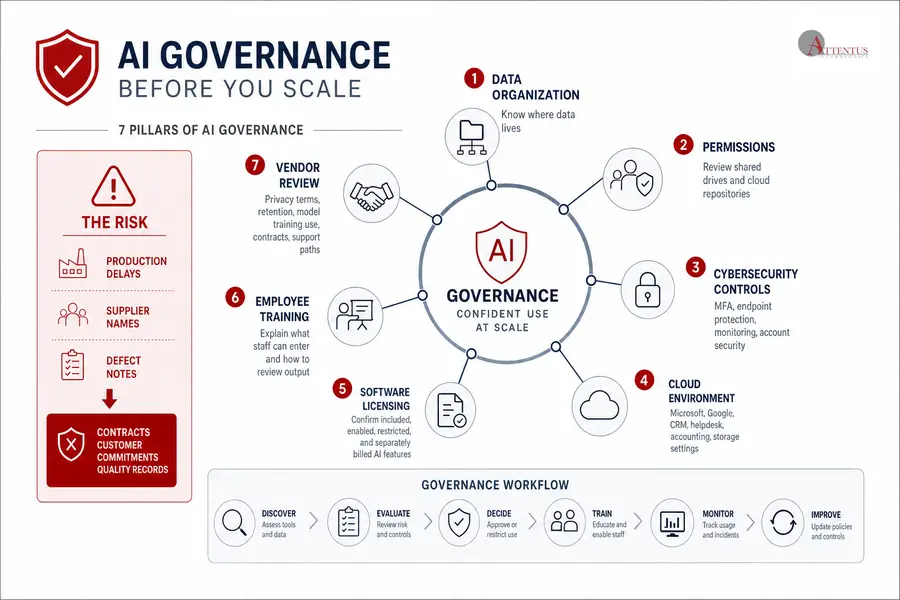
Shadow AI means employees use public or consumer-grade tools before leadership approves software, data rules, or review standards. That behavior is already common, since 78% of AI users bring their own AI tools to work. Governance is not red tape; it prevents avoidable mistakes once AI usage spreads across departments.
For AI for mid sized businesses, governance needs to show up in the systems people use every day:
-
Data organization: Know where customer records, HR files, finance data, and project documents live.
-
Permissions: Review who can access what, especially shared drives and cloud repositories with outdated access rules.
-
Cybersecurity controls: Require MFA, endpoint protection, monitoring, and account security before AI tools connect to email, files, CRM records, or helpdesk data.
-
Cloud environment: Check Microsoft, Google, CRM, helpdesk, accounting, and storage settings so AI features don’t turn on without clear ownership.
-
Software licensing: Confirm which AI features are included, enabled, restricted, or separately billed.
-
Employee training: Explain what staff can enter, what they must not enter, and how to review AI output.
-
Vendor review: Read privacy terms, retention rules, model training use, contract obligations, and support paths.
A manufacturer creates risk when a supervisor pastes production delays, supplier names, and defect notes into an unapproved chatbot to draft a shift report. That data can affect contracts, customer commitments, quality records, and future purchasing decisions.
Scheduled review matters here. A proactive IT support model reduces recurring risk over time by checking permissions, licensing, patching, monitoring, ticket patterns, and network activity, then turning those findings into fixes instead of letting the same issues return.
Plan Safer AI Adoption
Turn AI ideas into secure, practical workflows. Attentus Tech can help you assess tools, data, users, and governance before you scale.
AI In Everyday Business Must Keep People Accountable
AI can be useful and still produce answers with missing context, outdated details, weak sources, bias, or confident wording that isn’t supported. Review rules should be strongest wherever outputs affect money, customers, compliance, security, or employment decisions.
-
Customer messages need review. AI-drafted responses can miss contract terms, tone, order history, support status, or escalation details.
-
Financial work needs evidence. Invoice coding, reporting summaries, and spreadsheet formulas should be checked before approvals or payments move forward.
-
HR decisions need caution. Hiring, performance, and employee communications require fairness, context, and documented human judgment.
-
Security actions need control. AI can summarize alerts, but account lockouts, incident response, and access changes need approved procedures.
This is where IT support becomes part of the operating model, not just the tool setup. Identity management, endpoint security, cloud configuration, and backup validation all need clear ownership, documented procedures, and regular review so AI use doesn’t create new gaps in access, data protection, or incident response.
Sensitive issues also need clear escalation paths. When an AI tool exposes the wrong file, drafts an inaccurate customer response, or creates confusion during a security alert, access to accountable technical leadership helps resolve the issue before it grows.
AI For Secure Small Businesses Depends On IT Foundations
AI adoption touches more systems than most teams expect, and the business stakes are clear when IBM reported the global average cost of a data breach reached $4.88 million. Licensing affects budget, permissions affect data exposure, identity controls affect compromised accounts, backups affect recovery, and integrations affect support tickets.
-
Licensing before rollout: Confirm what Microsoft or Google AI features are included, what costs extra, and who should have access.
-
Permissions before search: Clean up file access so AI tools don’t surface payroll folders, legal drafts, or customer contracts to the wrong employees.
-
Security before experimentation: Apply MFA, endpoint protection, monitoring, and alert response before broad use.
-
Backups before automation: Verify recovery paths before AI-assisted workflows modify files, records, or customer data.
-
Support before scale: Define who handles user questions, broken workflows, inaccurate outputs, and access requests.
At Attentus Tech, we ask for company name, contact email, number of users, and the current IT situation before a managed IT meeting. That helps us scope the right support level, estimate needs, and avoid generic recommendations when AI planning touches licensing, cloud configuration, cybersecurity, procurement, engineering, and helpdesk workflows.
That end-to-end view matters because AI rarely stays inside one application. With managed IT, cloud, cybersecurity, procurement, and engineering support under one roof, we help simplify planning around one invoice, one vendor, and fewer handoffs when user accounts, software licenses, data access, and security controls all need attention.
Planning AI In Your Business With Attentus Tech
A practical rollout starts by educating leadership, inventorying current AI use, creating an acceptable use policy, piloting a low-risk workflow, training users, measuring results, improving controls, and then expanding gradually, especially as 67% of AI decision-makers plan to increase investment in generative AI within the next year. If you’re planning AI in your business, we can help evaluate tools, secure the systems those tools touch, review licensing, and map a manageable rollout across managed IT, cloud, cybersecurity, procurement, and engineering support. From that healthcare front desk using AI notes to the biller drafting appeal language, the goal is the same: keep useful tools moving while protecting records, approvals, invoices, and user accounts.